
Repo Atlas: Give Your AI Agent a Map of Your Codebase
A skill for Claude Code and Codex that builds persistent context documentation for any repository. Save tokens. Stop watching AI agents wander through your code.
You know that feeling when you watch an AI coding agent start a new task?
It reads a file. Then another. Then it starts searching. Grepping through directories. Reading files that have nothing to do with what you asked it to do. Five minutes later, it’s still “exploring the codebase” while you’re sitting there thinking about all the tokens you’re burning.
I’ve been using AI coding agents for months now. Claude, Cursor, Codex. They’re incredible when they work. But this pattern drives me insane, and not because the AI is bad. It’s because every time you start a fresh session, the agent has zero context about your codebase. It has to rediscover everything from scratch.
Where are the entry points? What’s the architecture? What files should it avoid touching? What are the gotchas that will break production?
Every. Single. Time.
Yes, you can add a CLAUDE.md file to your repo. I do that for all my projects. But it only does so much. It’s a starting point, not a complete map. Your agent still has to explore to find specific files, understand flows, and figure out what’s fragile. And every token spent exploring is a token not spent on the actual work.
So I built something more comprehensive.
What Is Repo Atlas?
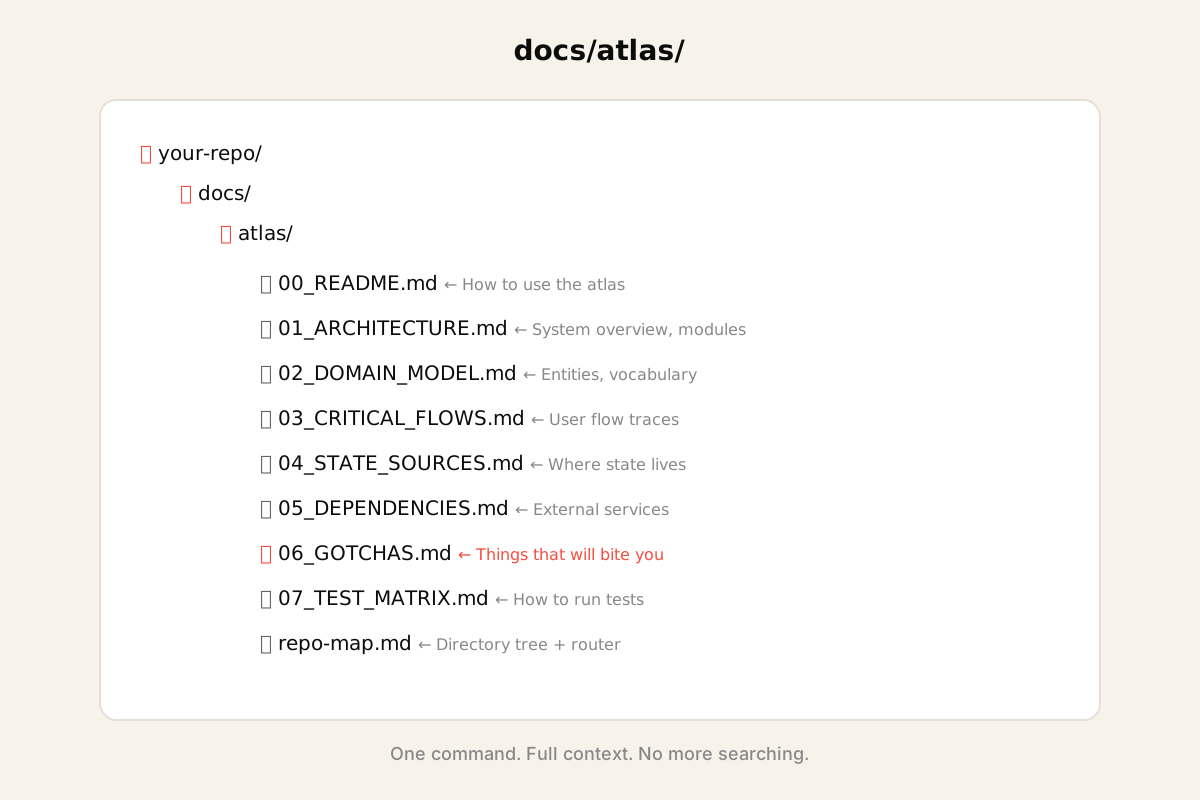
Repo Atlas is a skill for Claude Code and Codex that generates structured documentation for any repository. You run it once, and it creates a docs/atlas/ folder with everything an engineer (or AI agent) needs to understand your codebase fast.
No more exploration. No more searching. The agent loads the atlas, finds what it needs, gets to work.
What it generates:
- repo-map.md: Directory tree, entry points, file stats, and a “where to look for X” router table
- Architecture docs: System overview, component boundaries, how things talk to each other
- Domain model: Core entities, vocabulary, state machines
- Critical flows: Step by step traces of your most important user flows
- Gotchas: Race conditions, fragile files, things that will bite you if you touch them
- Test matrix: How to run tests, what’s covered, what’s not
- Changelog: Auto-generated from the last 14 days of commits
The auto-generated stuff (tree, changelog) regenerates with one command. The manual docs you write once and update when architecture changes. That’s it.
Why This Matters
Here’s what happens without an atlas:
- Agent receives task: “Fix the timer reset bug”
- Agent searches for “timer” across the codebase
- Agent finds 47 files mentioning “timer”
- Agent reads 12 of them trying to understand the flow
- Agent maybe finds the right file
- Agent finally starts working on the actual task
Here’s what happens with an atlas:
- Agent receives task: “Fix the timer reset bug”
- Agent loads
repo-map.md, sees the router table - Agent goes directly to
src/store/middleware/sessionPersistenceMiddleware.ts - Agent fixes the bug
That’s not an exaggeration. That’s what happened yesterday with my app. The agent with atlas context found and fixed the bug in 45 minutes. Without it? We were looking at hours of wandering through files.
Turns out giving your agent a map is way more efficient than watching it get lost.
The Two-Agent Workflow
Repo Atlas includes a workflow pattern I’ve found really effective. Two agents instead of one:
Agent A (Plan + Execute):
- Load the atlas for orientation
- Read the relevant domain doc for context
- Implement the change
- Run tests
Agent B (Verify):
- Review the diff against
06_GOTCHAS.md - Verify the change matches the flow in
03_CRITICAL_FLOWS.md - Check state consistency against
04_STATE_SOURCES_OF_TRUTH.md - Confirm tests pass
One agent builds, one agent verifies. The atlas gives both of them the context they need to do their job without burning tokens on exploration.
(You can do this with separate Claude sessions or use the agent delegation pattern. Whatever works for your setup.)
How to Use It
1. Install the skill in your Claude Code skills directory:
git clone https://github.com/cathrynlavery/repo-atlas.git
cp -r repo-atlas ~/.agents/skills/repo-atlas
2. In any project, tell Claude:
Say /repo-atlas or “map this repo” or “create atlas docs” and the skill kicks in.
3. Follow the 7-phase workflow:
The skill walks you through everything. Reconnaissance, generation, enhancement, writing the manual docs, adding build targets, verification. The generator script is pure Python 3 standard library. No dependencies. Works on any machine with Python installed.
(I’m slightly obsessed with zero-dependency tooling right now. Fewer things to break.)
Pair It With Codex
After generating your atlas, you can use my Codex skill to get a second opinion. Codex will independently review your atlas docs for accuracy, gaps, and missed gotchas.
/repo-atlas          # Build the atlas
/codex Review my atlas docs for accuracy and completeness
Two different AI models checking each other’s work. That’s how you catch mistakes before they hit production.
The Repo
Everything is open source:
github.com/cathrynlavery/repo-atlas
What’s inside:
SKILL.md: The skill definition with the full 7-phase workflowscripts/generate_atlas.py: The generator script (copy to your repo and customize)references/atlas-templates.md: Templates for each manual doc
MIT licensed. Fork it, modify it, use it however you want.
Why I Built This
I got tired of watching AI agents waste time.
Every time I started a new session, I had to re-explain the codebase. Or watch the agent stumble through files trying to build context. It felt like hiring a new contractor every day who had never seen the project before.
The atlas is the onboarding doc I wish every repo had. For humans and for AI. You write it once, and every agent that touches your codebase starts with full context instead of starting from zero.
If you’re using AI coding tools, you need persistent context. Otherwise you’re paying for the same exploration over and over again.
Give your agents a map. They’ll get there faster.
Questions? Find me on X/Twitter or check out more at founder.codes.